
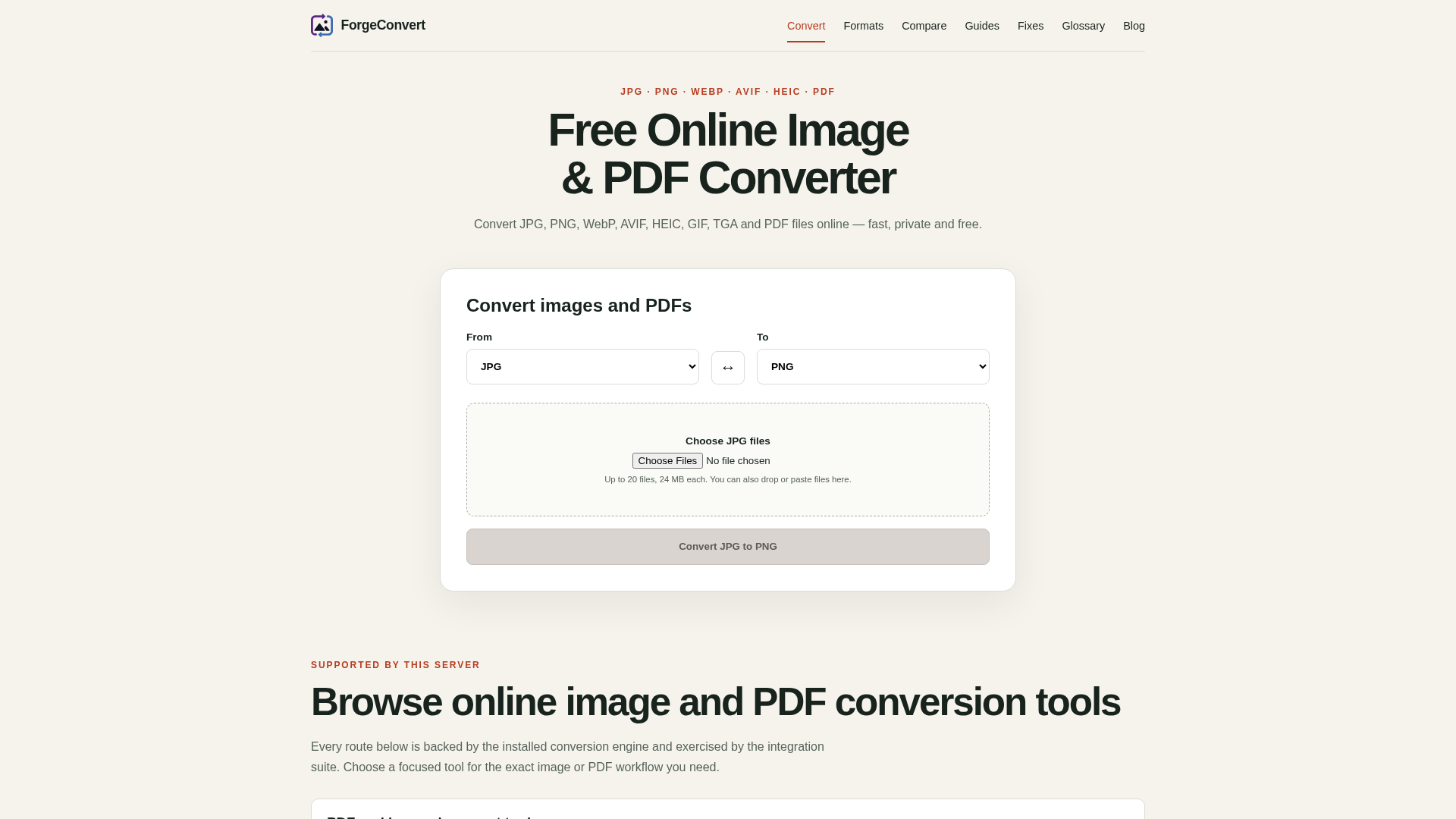
ForgeConvert is a free, online image and PDF converter designed for fast, private, and efficient file transformations. It supports a wide range of popular image formats like JPG, PNG, WebP, AVIF, HEIC, GIF, and TIFF, alongside comprehensive PDF conversion tools. This SaaS is ideal for individuals and businesses needing quick, secure, and hassle-free conversion of various image and PDF files without software installation or account creation.
Key Features
- Supports a wide array of formats: JPG, PNG, WebP, AVIF, HEIC, GIF, TIFF, BMP, ICO, TGA, and PDF.
- Batch conversion for up to 20 files or pages, with individual and ZIP downloads.
- PDF page extraction (to JPG, PNG, WebP) and image-to-PDF merging.
- Privacy-first approach: uploaded files are processed temporarily and not permanently stored.
- No registration or account creation required to start converting immediately.
- Modern format support including AVIF and WebP, alongside traditional formats.
Use Cases
ForgeConvert excels in various scenarios where efficient file conversion is crucial. Users can easily convert high-resolution camera images (like HEIC or TIFF) into web-optimized formats such as JPG or WebP, significantly improving website loading times and user experience. Graphic designers and content creators can leverage the tool to prepare images for different platforms, ensuring compatibility and optimal file sizes. For document management, ForgeConvert allows users to export specific pages from a PDF document as individual images (JPG, PNG, or WebP), which is perfect for presentations, social media sharing, or extracting visual content. Conversely, multiple images can be combined into a single PDF, streamlining document creation for reports, portfolios, or digital archives. Its ability to handle various image types, including legacy formats like TGA and BMP, makes it a versatile solution for diverse conversion needs.Pricing Information
ForgeConvert is completely free to use. There are no hidden costs, subscriptions, or requirements for account registration, making it an accessible tool for everyone.User Experience and Support
The platform boasts a user-friendly interface, guiding users through a simple four-step conversion process: upload, choose output format, convert, and download. Its responsive design ensures seamless functionality across desktop, tablet, and mobile browsers, providing convenience on any device. While dedicated tutorials are not explicitly listed, the intuitive workflow and a comprehensive FAQ section address common queries, ensuring a smooth user experience.Technical Details
Underpinning ForgeConvert is a robust installed conversion engine and an integration suite that ensures reliable performance. The service leverages modern image processing capabilities, including rasterization of SVG input and handling of various image formats as bounded 24-bit or 32-bit true-color pixels for BMP. The mention of `libvips` in the 'Coming-soon' section suggests a powerful and flexible backend for image manipulation.Pros and Cons
Pros:
- Completely free with no registration required.
- Strong emphasis on user privacy (temporary file processing).
- Extensive support for popular and modern image/PDF formats.
- Efficient batch conversion and specialized PDF tools.
- Accessible and functional across all major devices (desktop, tablet, mobile).
- Simple, intuitive, and fast conversion workflow.
Cons:
- Does not preserve animation or handle multipage image files.
- Batch limit of 20 files/pages per conversion.
- No advanced image editing features beyond format conversion.
- Input-only support for some formats like SVG and HEIC.
Conclusion
ForgeConvert stands out as a highly practical, free, and privacy-conscious online tool for all your image and PDF conversion needs. Its ease of use, broad format compatibility, and commitment to user privacy make it an invaluable resource for quick and reliable file transformations. Explore ForgeConvert today for seamless and secure conversions.Comments
Achievement


Publisher

Launch Date2026-08-15
Platformweb
Pricingfree
Tech Stack
#web
Sponsors

DF Tube New (Distraction Free for YouTube™)
Allow yourself to focus while using YouTube™ for work, recreation or education.

ShipThing
Share your product with the world, one small step at a time.
Become a Sponsor
Get your brand featured here
Outbid
View🥇 🥈
🥈 🥉
🥉
Want this spot? Pay what you wantBest Launch Directories: launch directories with DR, traffic and pricing
Launch directories, product launch platforms and startup listing sites in one table, with Domain Rating by Ahrefs, traffic where known, pricing and link type for each.
$50
Boost Your Domain Rating — DoFollow Backlinks (DR 30–70) from $30
Raise your Ahrefs Domain Rating with 5 - 50 dofollow backlinks from DR 30–60 sites — from $50, guaranteed to improve your DR or your money back.
$45
DirEasy - The Best Directory Boilerplate with AI | DirEasy
The best directory boilerplate, packed with AI, Listings, Payment, Submission, CMS, Blog, Authentication, Newsletter, SEO and more.
$41