Lynara Review - Precise Multi-Layer System Architecture Design Tool
Lynara: Architecture Diagrams That Don't Collapse Under Complexity
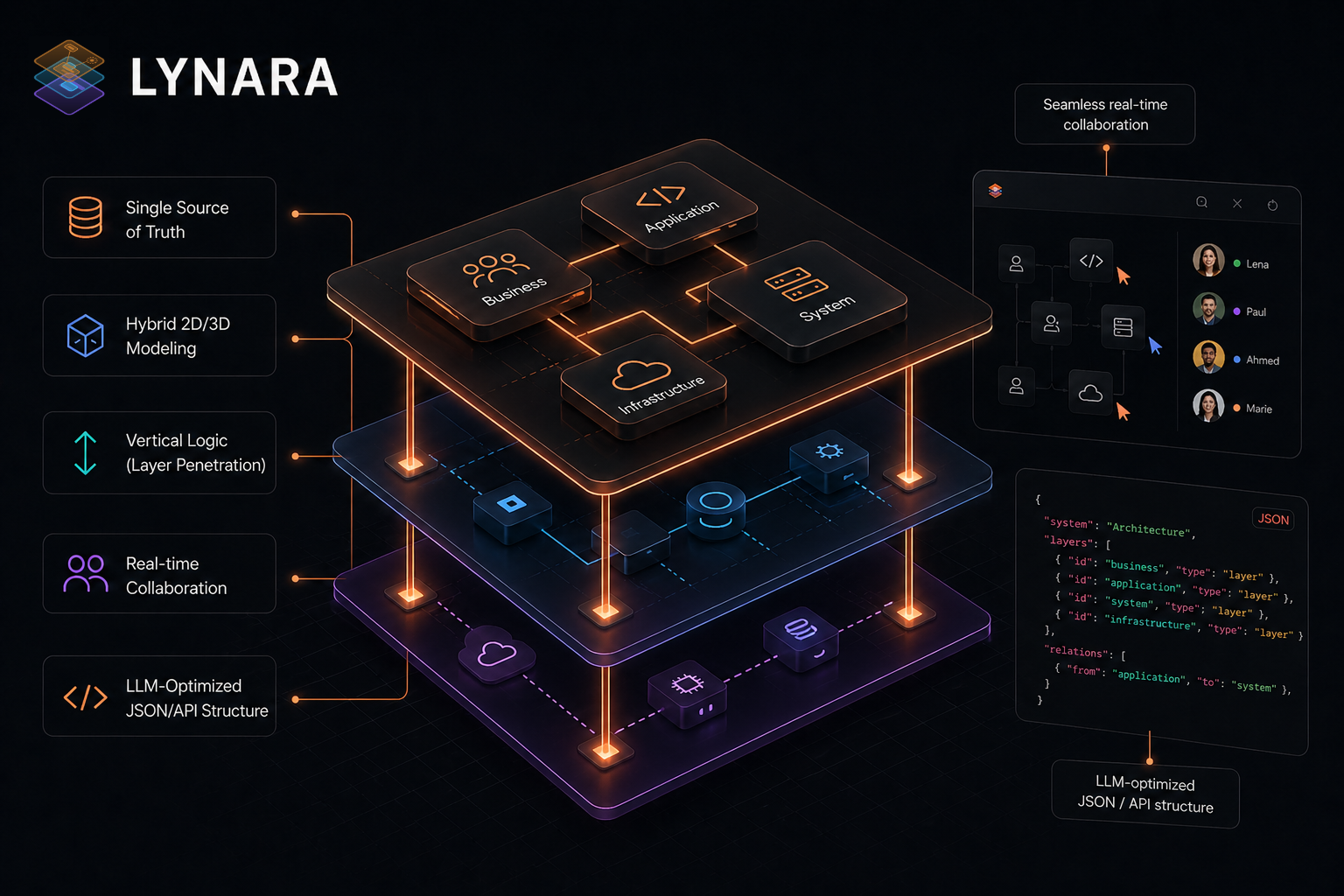
Draw a microservices architecture with 30+ components in Figma or Miro, and something predictable happens: around component 15, the diagram becomes unreadable. Lines cross everywhere. Service boundaries blur. Three weeks later, nobody—including the person who drew it—can explain what's happening without 20 minutes of narration.
Lynara was designed specifically to solve this: architecture diagrams that remain comprehensible as complexity grows, because they're organized in explicit layers rather than flattened onto a single canvas.
The Flat Canvas Problem
Traditional diagramming tools treat architecture as a 2D picture. You drag boxes onto a canvas and draw lines between them. This works for 5-10 components. Beyond that:
- Service boundaries become invisible as boxes and lines pile up
- Infrastructure details (load balancers, message queues) get buried under application components
- Data flows become indistinguishable from API calls
- Updating one component requires repositioning everything else
- The diagram becomes documentation theater—something you drew once but never updated
Real architecture has inherent vertical structure: frontend, API gateway, business logic, persistence, infrastructure, external services. Each layer has sub-layers. Flat canvases ignore this entirely.
Lynara's Layer-First Model
Lynara organizes architecture into five standard layers, each with explicit semantics:
Presentation Layer: User-facing components—web apps, mobile clients, API consumers. Application Layer: Business logic, controllers, service orchestration, event handlers. Data Layer: Databases, caches, message queues, search indices. Infrastructure Layer: Container orchestration, load balancers, monitoring, CI/CD. External Services: Third-party APIs, payment processors, analytics, identity providers.
Components within each layer have defined relationship types—sync API calls, async messaging, data flows, event streams. Relationships display with clear visual semantics rather than ambiguous lines.
The layer system means you can toggle visibility: show the full architecture for system overview, collapse to the application layer for service design discussions, expand the data layer for database architecture review.
Real-Team Testing
Three engineering teams modeled their production architectures in Lynara:
A marketplace SaaS with 28 components across 5 layers was diagrammed in 2.5 hours—versus 6+ hours in Figma with ongoing maintenance. The layered organization made architectural decisions immediately visible.
A fintech platform with 47 components across 6 layers was diagrammed in 4 hours. Previously, the team had spent 10+ hours attempting this in Miro and never completed it. New engineer onboarding time dropped from 2 weeks to 5 days using the Lynara diagram as the primary orientation artifact.
An analytics infrastructure team with 56 components across 7 layers diagrammed their system in 5.5 hours. The visualization revealed unnecessary complexity they hadn't noticed before—services that could be consolidated, redundant data paths, orphaned infrastructure.
LLM-Optimized Export
One genuinely novel feature: Lynara can export architecture as structured data optimized for consumption by LLMs like Claude and ChatGPT. This enables architecture review by AI ("analyze this microservices design for single points of failure"), automated documentation generation, and onboarding assistance (new engineers can upload the export and ask natural-language questions about the architecture).
Most tools treat diagrams as visual artifacts. Lynara treats them as data structures that can be programmatically analyzed.
Collaboration and Sharing
Real-time collaborative editing. Comments on individual components. Version history tracking. Export to Mermaid (machine-readable), SVG/PNG (presentation-ready), and JSON (integration-ready).
Pricing
- Starter (Free): Up to 3 projects, basic layers, PNG/SVG export
- Professional ($19/month): Unlimited projects, advanced layers, real-time collaboration, Mermaid and LLM export
- Team ($99/month): Workspace management, audit logs, priority support
Who Lynara Is For
Software architects designing new systems or documenting existing ones. Engineering leads onboarding new team members—a well-layered diagram replaces hours of verbal explanation. Platform teams managing complex infrastructure. Teams transitioning from monoliths to microservices who need to visualize the target state. Anyone using AI for architecture review (the LLM export feature is genuinely distinctive).
The Verdict
Lynara succeeds by recognizing an architectural truth that diagramming tools ignore: complexity is manageable when organized by layer. By separating concerns vertically and making relationships explicit, it produces diagrams that remain useful as systems grow—rather than diagrams that become obsolete the moment they're completed.
For teams managing complex architectures, the layer-based model provides clarity that flat-canvas tools can't match. For teams starting new systems, it enforces discipline that prevents the diagram-from-chaos pattern that plagues most architecture documentation.
Rating: 4.5/5
Ready to diagram architecture that scales?
👉 Try Lynara Free and build your first layered architecture diagram today.
Tags
# Review# Lynara# software architecture visualization tool# system architecture design tool# architecture diagram tool# software architecture platform# Multi-layer architecture design# Cloud-native architecture# Microservices architecture# Architecture mapping# Interactive architecture canvas# System design visualization# Enterprise architecture# Architecture documentation# LLM-optimized export# Mermaid diagram export# Team collaborationQuizShot Review - AI Chrome Extension Solving Homework Problems in Seconds with 95% Accuracy
Femora Care Review - AI-Powered Fertility Tracking That Helps Women Understand Their Real Body Signals
Follow for new blogs
Subscribe to our blog
Subscribe to Newsletter
Subscribe to our newsletter to get the best products weekly.